

Most front-end developers glaze over at the mention of the word. However, having a strong grasp of how CSS Specificity works is key to minimizing tedious debugging. Specificity tells the browser what rules to apply to an element, and if there is a conflict then the higher priority wins.
Let’s look at some simple examples, and put this concept into context.
Pop Quiz – Question #1: Rule Order
[snippet slug=class-vs-class line_numbers=false lang=html][snippet slug=class-vs-class-css line_numbers=false lang=cs]
What is the background-color of the <div> based on the example above?
If you answered blue, you are correct.
Since the declaration comes later in the CSS (near the bottom), it has a higher specificity. This is fundamentally the simplest rule of the cascade in Cascading Style Sheets (CSS). If there is a conflict in rules (e.g. background-color: blue vs background-color: red), and since the classes have the same weight, then the cascade wins.
A similar scenario is the following:
[snippet slug=css-rule-order-html line_numbers=false lang=html][snippet slug=css-rule-order-css line_numbers=false lang=cs]
Again, the same outcome, because background-color: blue comes later in the declaration block.
Ok, that was easy. Now let’s try one that’s a little harder:
Pop Quiz – Question #2: Pseudo-element vs Pseudo-class
[snippet slug=pseudo-element-vs-pseudo-class-hmtl line_numbers=false lang=html][snippet slug=pseudo-element-vs-pseudo-class-css line_numbers=false lang=cs]
What color will the text be?
This time red wins. The h1::first-line pseudo-element has higher specificity than the h1:first-child pseudo-class. Here is how we can calculate and know for sure:
Calculating Specificity
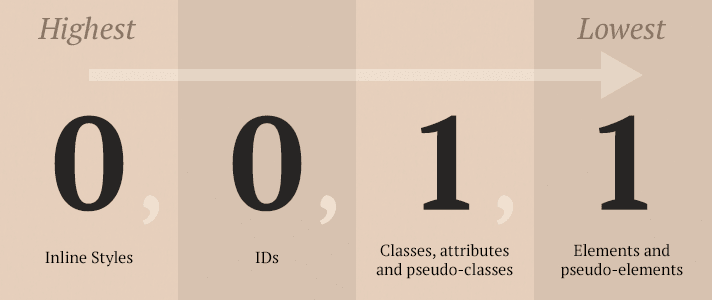
Here are the rules for calculating specificity, as outlined by W3C:
- Count the number of ID selectors in the selector (= a)
- Count the number of class selectors, attributes selectors, and pseudo-classes in the selector (= b)
- Count the number of type selectors and pseudo-elements in the selector (= c)
- Count the number of element names and pseudo-elements in the selector (= d)
- Concatenating the three numbers a-b-c (in a number system with a large base) gives the specificity.
[snippet slug=calculating-specificity-examples lang=cs]
So let’s calculate and compare the Specificity of the example (Pop Quiz – Question #2: Pseudo-element vs Pseudo-class) up above to verify our answer was correct.
[snippet slug=pseudo-element-vs-pseudo-class-calculate-specificity lang=cs]
A Few Special Rules
- Ignore the universal selector (*), as it is worth 0.
!importantoverrides everything! Please avoid it at all costs.:not()– a negation pseudo-class adds no specificity by itself. Only what’s inside the parenthesis is added to specificity value. e.g.#s12:not(FOO) /* a=1 b=0 c=1 -> specificity = 101 */
Conclusions
Basically, only be as specific as you need to be. Being too specific mostly makes it harder to override things further down the line.
Tools & Further Reading
- “CSS Specificity: Things You Should Know” – SmashingMagazine.com
- Specificity Calculator – A visual way to understand CSS specificity.
- “Calculating a selector’s specificity” – W3.org
- CSSSpecificity.com – CSS Specificity infographic that uses The Shining to demonstrate specificity.
- “Specifics on CSS Specificity” – CSSTricks.com
- CSSDig.com – Chrome extension for analyzing any site’s CSS in a new way.
How this can be: “h1::first-line pseudo-element has higher specificity than the h1:first-child pseudo-class”? Specificity of h1:first-child is 22 and it’s higher than 2 of h1::first-line. So why blue doesn’t win? I don’t understand, is it some mistake?
Technically speaking, `:first-line` will refer to a portion of the text node that is _the child_ of whatever element it is a part of. Whereas `:first-child` will apply to the element itself.
In other words, if you were to apply styling to`h1:first-child` the text node is *inheriting* that style from its parent (the h1). `h1:first-line` will specifically refer to the first line of the text node and so is going to be the most specific selector for the text.
Here’s a CodePen with a multi-line h1 that may help visualize what is happening a bit better: https://codepen.io/Cheffheid/pen/bGVdXNx